Wallet tutorials · 14 MIN READ
Buy Safex Cash and Safex Token with Bitcoin
Buy SFX or SFT with Bitcoin from your wallet or an exchange such as Coinbase. Follow real payments, understand the three-hour deadline, and find your incoming coins.
 Daniel Dabek · September 28, 2026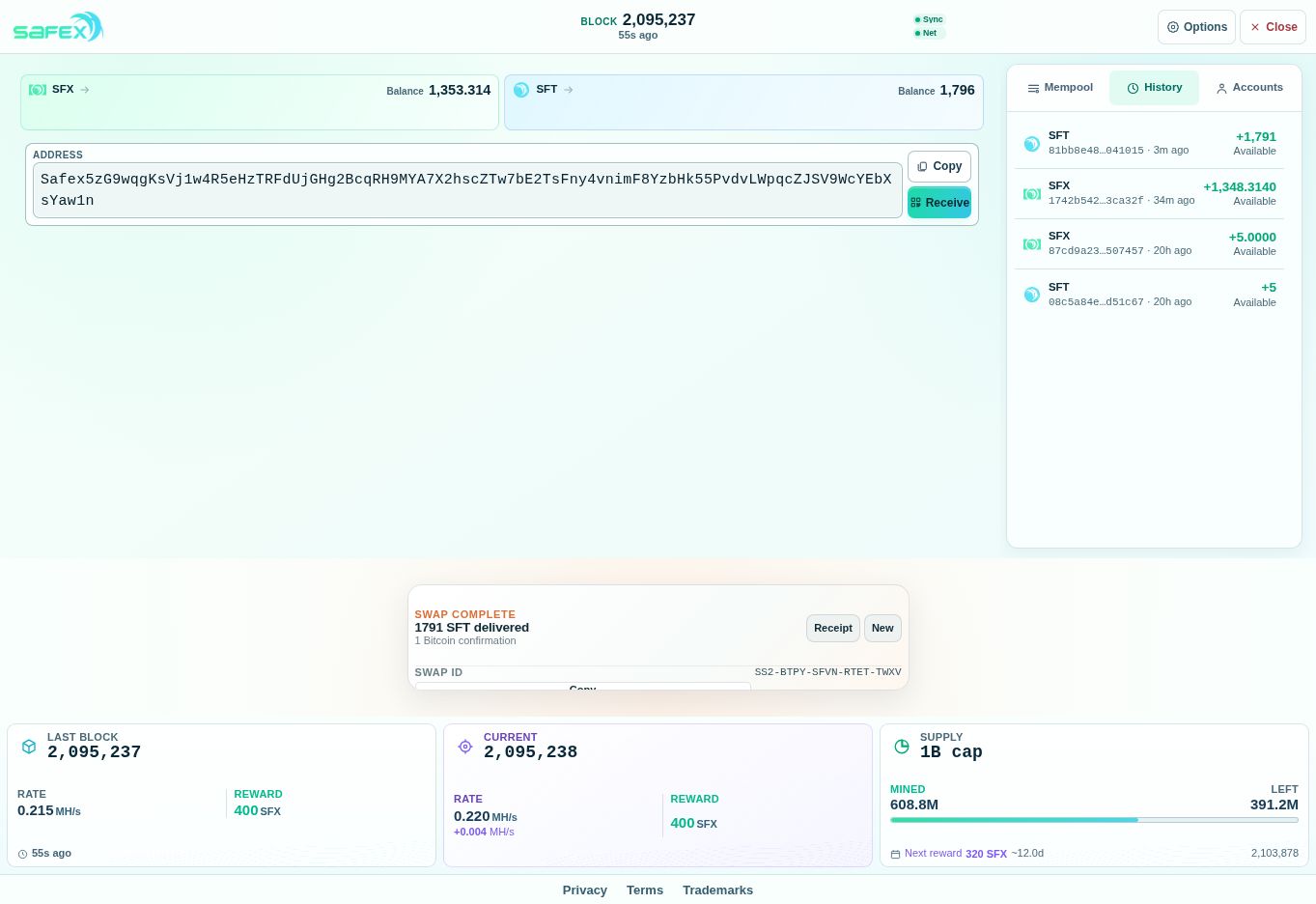
You can use Bitcoin to buy either Safex Cash (SFX) or Safex Token (SFT) through the Safex Swap panel at safex.org. This walkthrough follows a real purchase into the same wallet we used for the starter faucet. You will see the destination choice, the purchase checkboxes, the Bitcoin invoice and the incoming Safex payment.
Already following this series? Reopen your existing wallet. If you need help, use the wallet setup and faucet guide or the guide to opening your wallet again.
What are SFX and SFT for?
Your wallet holds two different assets at one public Safex address. Selecting one in the purchase panel determines which asset you receive.
| Asset | Purpose in plain language |
|---|---|
| Safex Cash — SFX | The payment currency. It is used for payments, blockchain transaction fees and commerce on Safex. New SFX is issued through mining. |
| Safex Token — SFT | The marketplace utility token. It is used for marketplace participation, including account functions and staking. Staking means deliberately locking tokens under the network's rules; simply receiving SFT in your wallet does not start staking. |
SFX and SFT have separate balances and are not interchangeable. Keep some SFX available for transaction fees when using your wallet. Buying either asset does not guarantee a profit or a particular marketplace feature; the purchase agreement explains that features depend on the software and network available when you use them.
1. Open your wallet and choose what to buy
Open safex.org and restore the wallet you have already backed up. Check the public address before continuing. If paying from an exchange, first make sure your Bitcoin is available to withdraw and read the exchange section below before creating an invoice. Our demonstration wallet starts with 5 SFX and 5 SFT from the faucet.
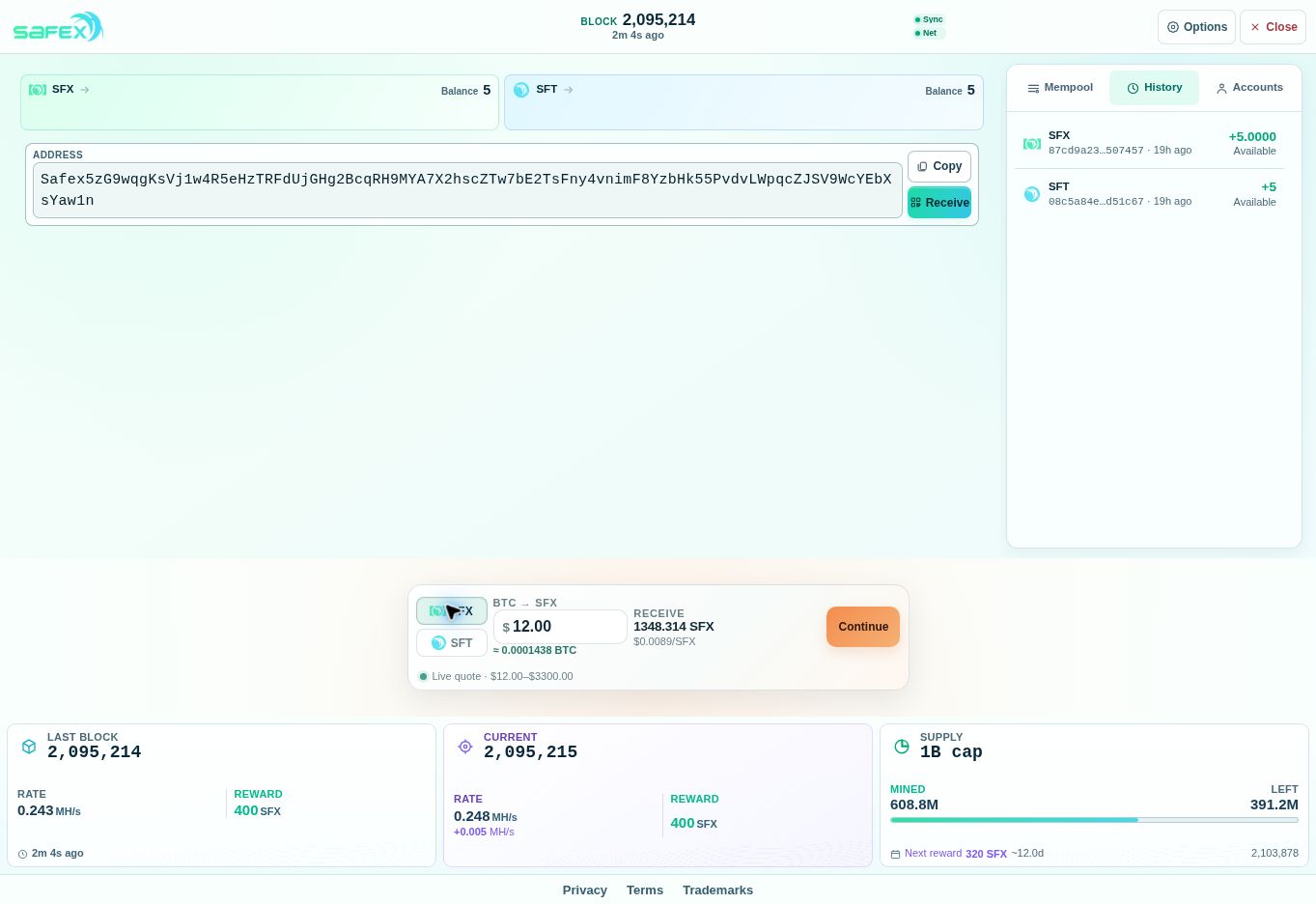
Find Safex Swap near the bottom of the wallet. Select SFX or SFT, then enter a purchase value in the USD purchase amount field. This field sets the dollar value of the quote; payment is made in Bitcoin. Check the displayed quantity and Bitcoin amount, then choose Continue.
Our SFX example used a $12 quote for 1,348.314 SFX. Prices and purchase limits can change, so read your own live quote rather than copying these numbers.
2. Choose the receiving wallet and review the agreement
On Where should your Safex arrive?, select This opened wallet. Compare its address with the wallet you opened. Our address ends in WcYEbXsYaw1n, matching the earlier faucet tutorial. Your address will be different.
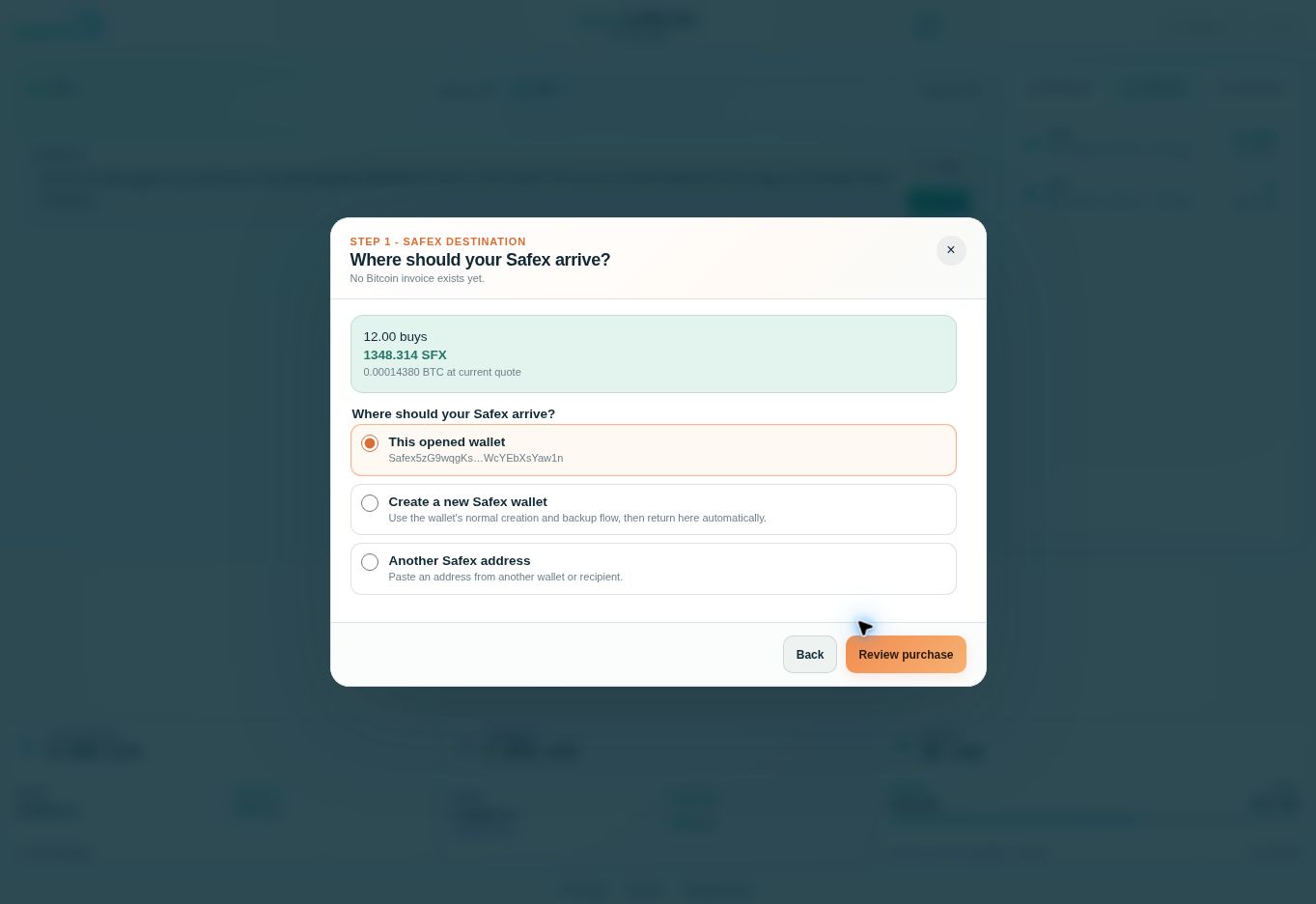
Choose Review purchase. Check the asset, quantity, Bitcoin payment amount and Safex destination. The destination is fixed for the accepted order, so this is the time to correct a mistake.
Read the agreement and tick each acknowledgement only when it is true for you:
- You checked the receiving Safex address.
- You understand Bitcoin payments are irreversible.
- You understand the partial-payment policy.
- You understand the late-payment policy.
- You accept the Purchase Agreement and Terms of Use.
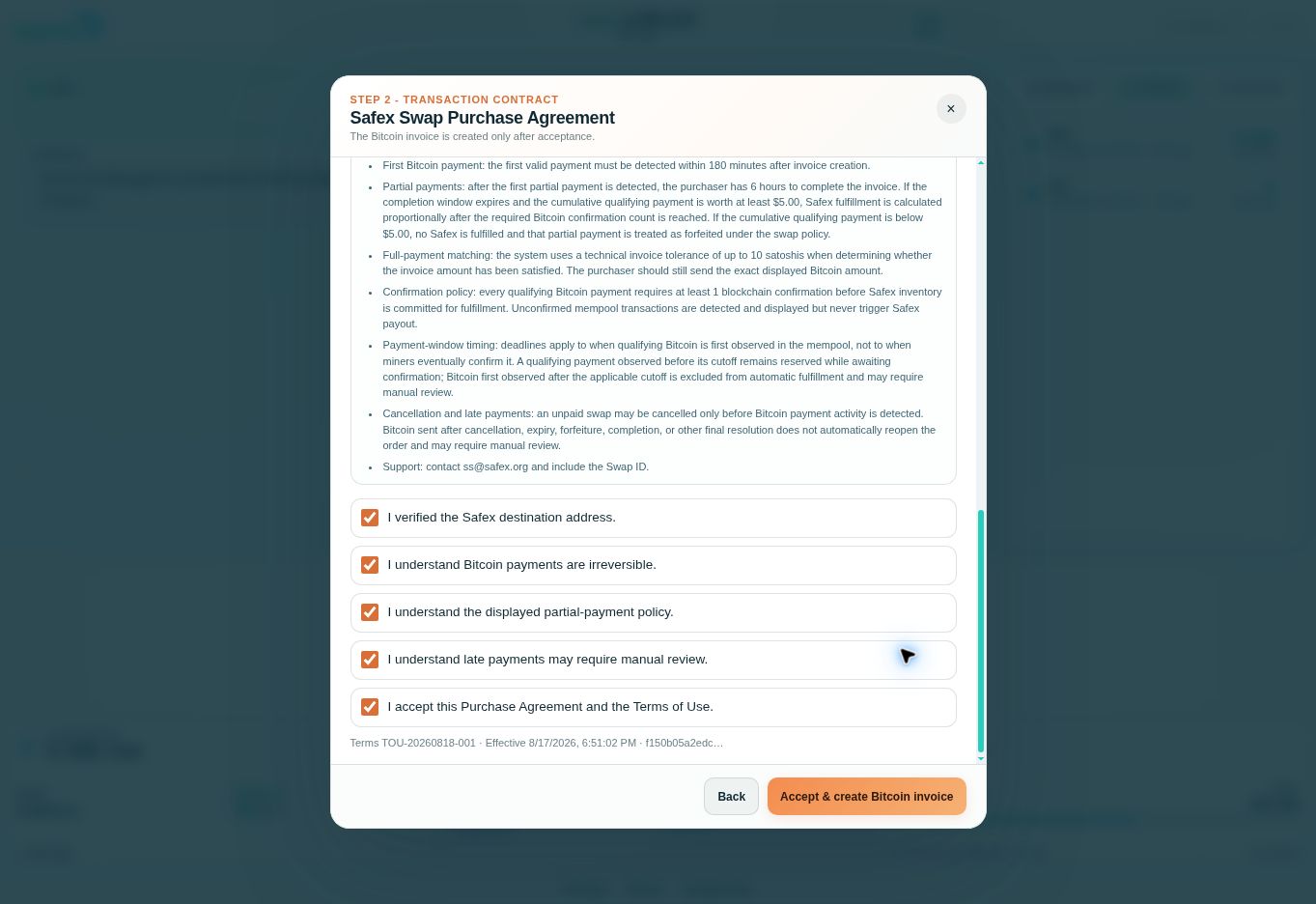
When you are ready to make the purchase, choose Accept & create Bitcoin invoice. If the quote has changed while you were reading, the site may show Review the updated quote. Read the new figures before accepting them; this happened in our demonstration.
3. Pay the fresh Bitcoin invoice
The invoice gives you a Bitcoin amount, a Bitcoin address, a QR code, a payment deadline and a Swap ID. Save the Swap ID so you can identify the order later.
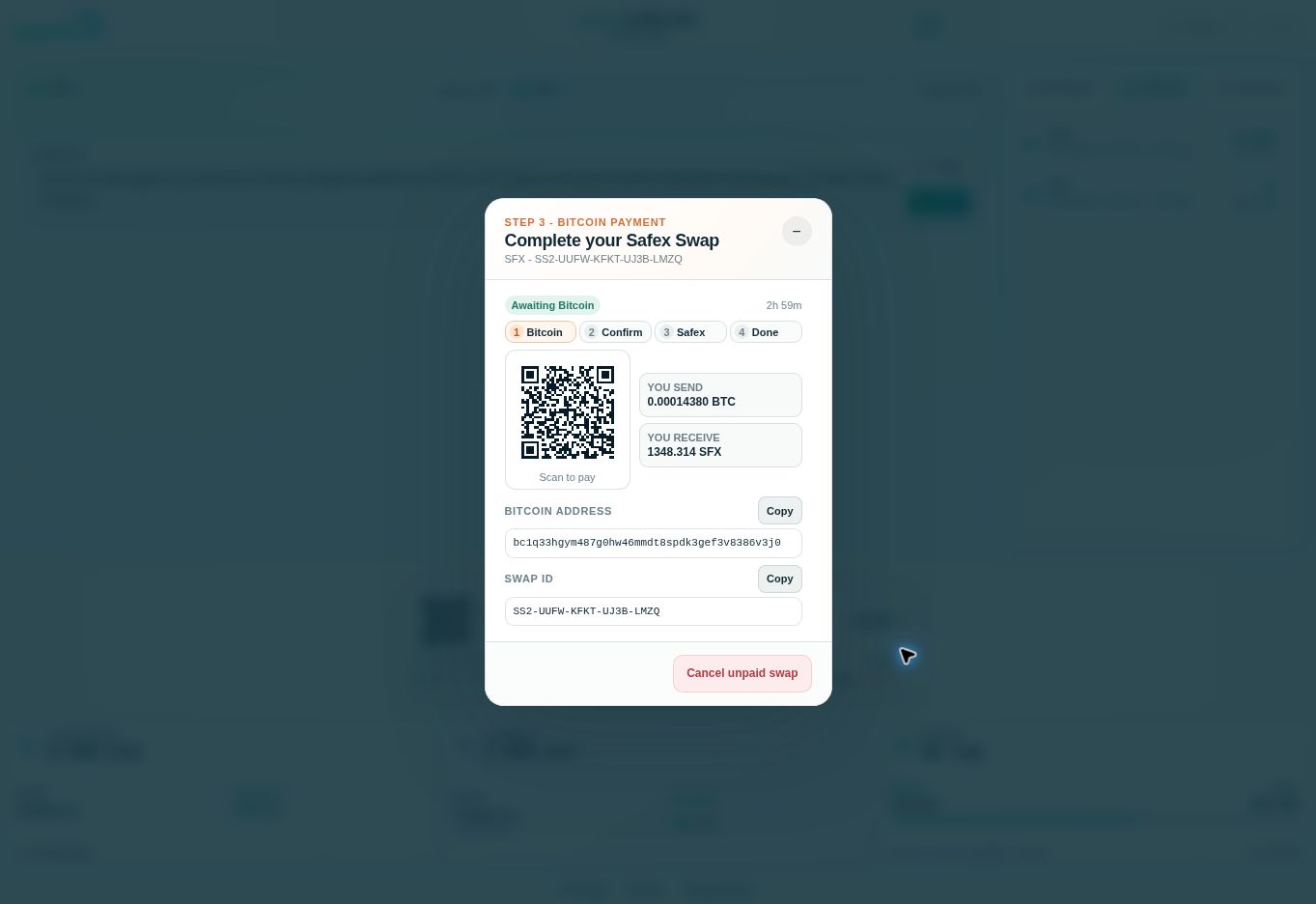
The invoice above is a completed demonstration order. Never send Bitcoin to an address or QR code from this article. Create your own fresh invoice.
In your Bitcoin wallet, scan the QR code or copy the address from your live invoice. Check the destination and enter the exact BTC amount shown. Allow for your Bitcoin wallet's sending fee so the invoice receives the full requested amount. Confirm that the transfer uses the Bitcoin network, then send it before the displayed deadline.
For this purchase, the buyer sent 0.00014380 BTC, or 14,380 satoshis. A satoshi is one hundred-millionth of a bitcoin. This was the invoice amount; the Bitcoin wallet's sending fee was separate.
There are two addresses in this process: Bitcoin goes to the invoice's Bitcoin address, and the purchased SFX or SFT goes to the Safex destination selected earlier. Keep those roles separate.
How long do I have to pay?
A new invoice gives you 180 minutes — three hours — for the first Bitcoin payment to be detected. The countdown starts when the invoice is created. You have time to open your Bitcoin wallet or exchange account and complete the transfer; you do not have to send it in the same minute.
What matters is when Safex Swap first sees the Bitcoin transaction on the network, not when you click Withdraw on an exchange. An exchange request that is still waiting internally has not reached the swap.
| What happens | How the time limit works |
|---|---|
| You pay the full amount | The payment must first be detected within the invoice's three-hour window. |
| The payment is detected in time but is still unconfirmed | It remains reserved while Bitcoin confirmation is pending. It does not become late just because miners confirm it after the countdown ends. |
| Your first payment is only part of the invoice | Once that first qualifying partial payment is detected, you have six hours to complete the amount. This is not an extra six hours for an invoice with no payment. |
| The six-hour partial-payment window ends | Qualifying payments worth at least $5 are fulfilled proportionally after the required Bitcoin confirmation. Below $5, the agreement says no Safex is delivered and the partial payment is forfeited. |
| The payment first arrives after its deadline, or after cancellation or another final resolution | It does not automatically reopen the order. Contact the swap's support with your Swap ID for review. |
For example, an invoice created at 2:00 p.m. has an initial 5:00 p.m. cutoff. A full payment detected at 4:50 p.m. can wait for its Bitcoin confirmation after 5:00 p.m. A withdrawal requested from an exchange at 4:50 p.m. but first detected by the swap at 5:10 p.m. is late. If a qualifying first partial payment is detected at 4:00 p.m., its six-hour completion window runs to 10:00 p.m.
These are the rules displayed during this tutorial. Read the countdown and policy in your own purchase agreement, since the live service can change its terms. Paying the exact full amount promptly is the simplest route.
Can I pay from Coinbase, Kraken, Binance or another exchange?
Yes, an exchange account can be the source of your Bitcoin payment when it allows an on-chain BTC withdrawal to the invoice address. You do not need to buy SFX or SFT on that exchange: you send Bitcoin to Safex Swap, and Safex Swap delivers the chosen asset to your Safex wallet.
The three-hour window gives you room to complete an ordinary withdrawal from Bitcoin already available to send. It is not a guarantee that every exchange withdrawal will arrive within three hours. Check your account's withdrawal availability before creating the invoice. Fresh bank deposits, security checks, address approval delays and withdrawal processing can take longer. For example, Kraken describes holds that can last 72 hours, and Crypto.com says withdrawal processing can normally take up to two to three hours. Leave a margin.
These major exchanges publish external-withdrawal instructions. Open the relevant official guide for your account and region:
| Exchange | Official sending or withdrawal help |
|---|---|
| Coinbase | Send crypto to an external blockchain address |
| Kraken | Withdraw cryptocurrency from Kraken |
| Binance | Deposit and withdraw cryptocurrency |
| Binance.US | Withdraw crypto to an external wallet |
| Gemini | Withdraw crypto from Gemini |
| Crypto.com | Bitcoin withdrawal information |
| Bitstamp by Robinhood | Send and receive Bitcoin |
| OKX | Make an on-chain withdrawal |
| KuCoin | Withdraw to another Bitcoin wallet |
| Bybit | Submit an on-chain withdrawal |
These are examples of Bitcoin sources, not claims that the exchanges list SFX or SFT or partner with Safex. Services, minimums and withdrawal permissions vary by account and country. Other exchanges can work under the same conditions.
On your exchange's withdrawal screen, choose Bitcoin (BTC) and the Bitcoin network, paste the address from your live invoice, and check that the amount the recipient will receive equals the invoice amount after fees. This invoice uses an ordinary Bitcoin address; do not choose Lightning, a wrapped-Bitcoin network or an internal email/username transfer. Complete any required confirmation email or verification step.
If the exchange asks who receives the payment, describe the destination truthfully as required by its process: the invoice's Bitcoin address belongs to the swap service. Your own Safex address is the separate destination for the purchased coins.
Check withdrawal minimums before selecting the size of your Safex purchase. Our $12 example may be below an exchange's minimum or uneconomical after its withdrawal fee. If your account cannot send promptly, first withdraw Bitcoin to a wallet you control, wait until it is available there, and then create a fresh Safex invoice. That extra transfer has its own fee.
4. Watch the payment turn into incoming Safex
After the Bitcoin transaction was broadcast, our invoice changed to Bitcoin payment detected and showed the full 0.00014380 BTC received. It initially displayed 0/1 confirmation.
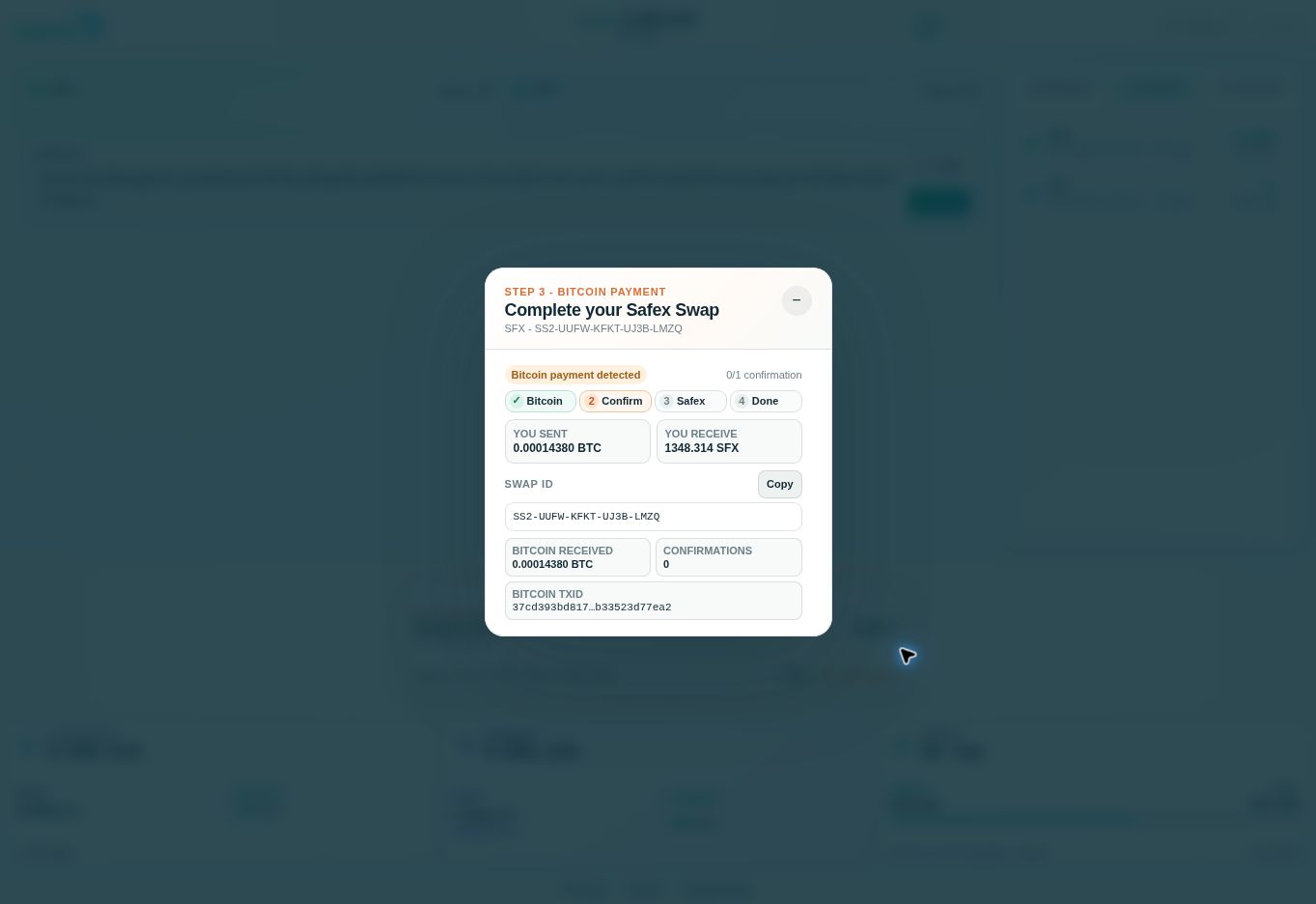
At this point, the swap has seen the Bitcoin payment. It waits for one Bitcoin confirmation before sending the Safex payout. You do not need to pay again while it waits.
Use the minus button to minimize the swap and view your wallet. Mempool shows live Safex transactions waiting to enter a block; the swap panel tracks your Bitcoin payment. The incoming Safex transfer may appear in Mempool briefly. If it has already moved on, check History.
In our SFX demonstration, the payment had already entered History by the time we captured the wallet. We did not capture a pending Mempool entry for this purchase.
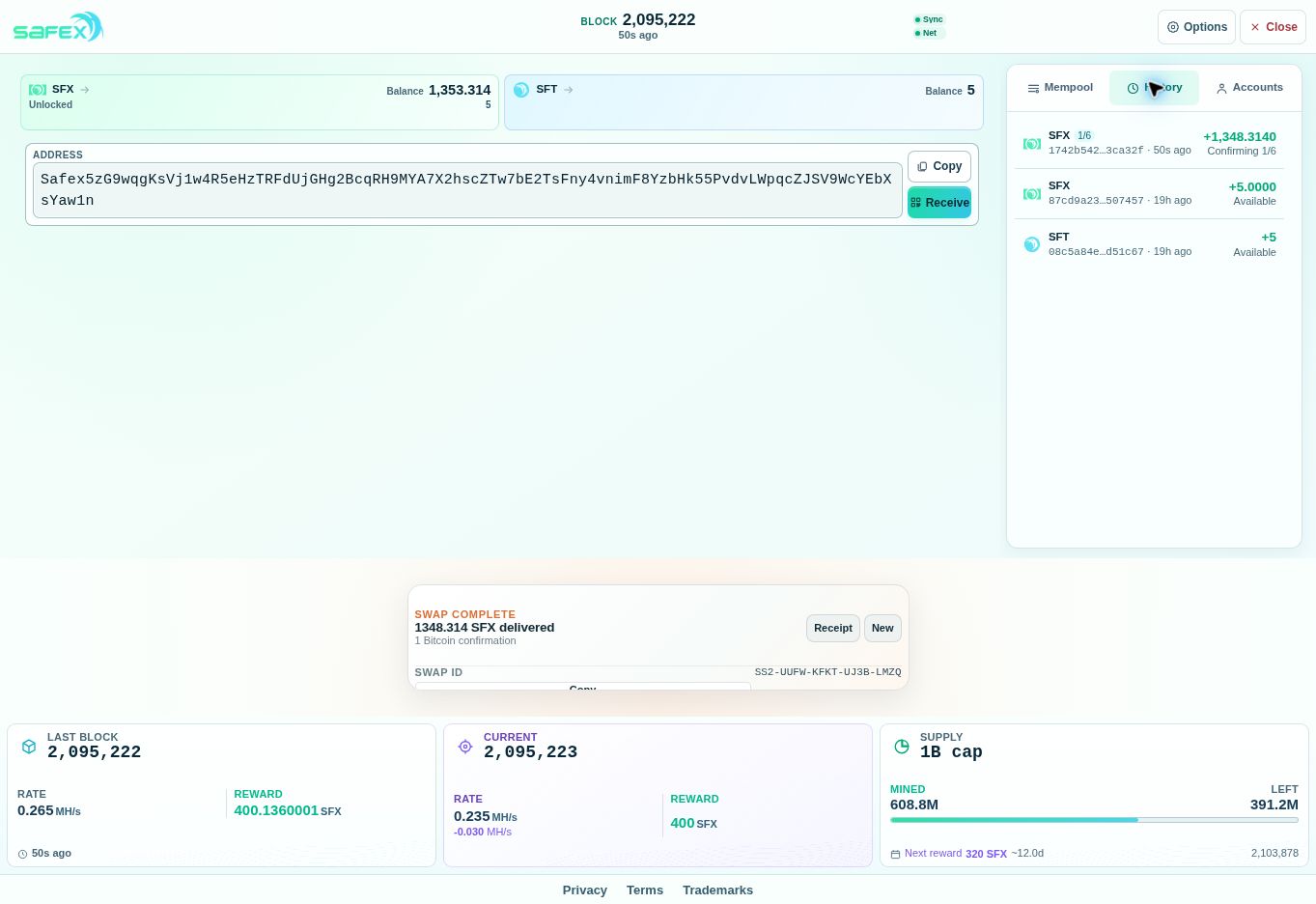
The new row shows +1,348.3140 SFX. The plus sign means coins came into the wallet. Adding that purchase to the original 5 SFX gives a balance of 1,353.314 SFX. The original SFT balance stays at 5 because this order bought SFX.
The first History screenshot says Confirming. Let the wallet finish updating. When it says Available, the incoming coins are ready to use. If the wallet shows a separate Unlocked amount, that is the portion currently available to send. Follow these wallet labels as the transaction progresses.
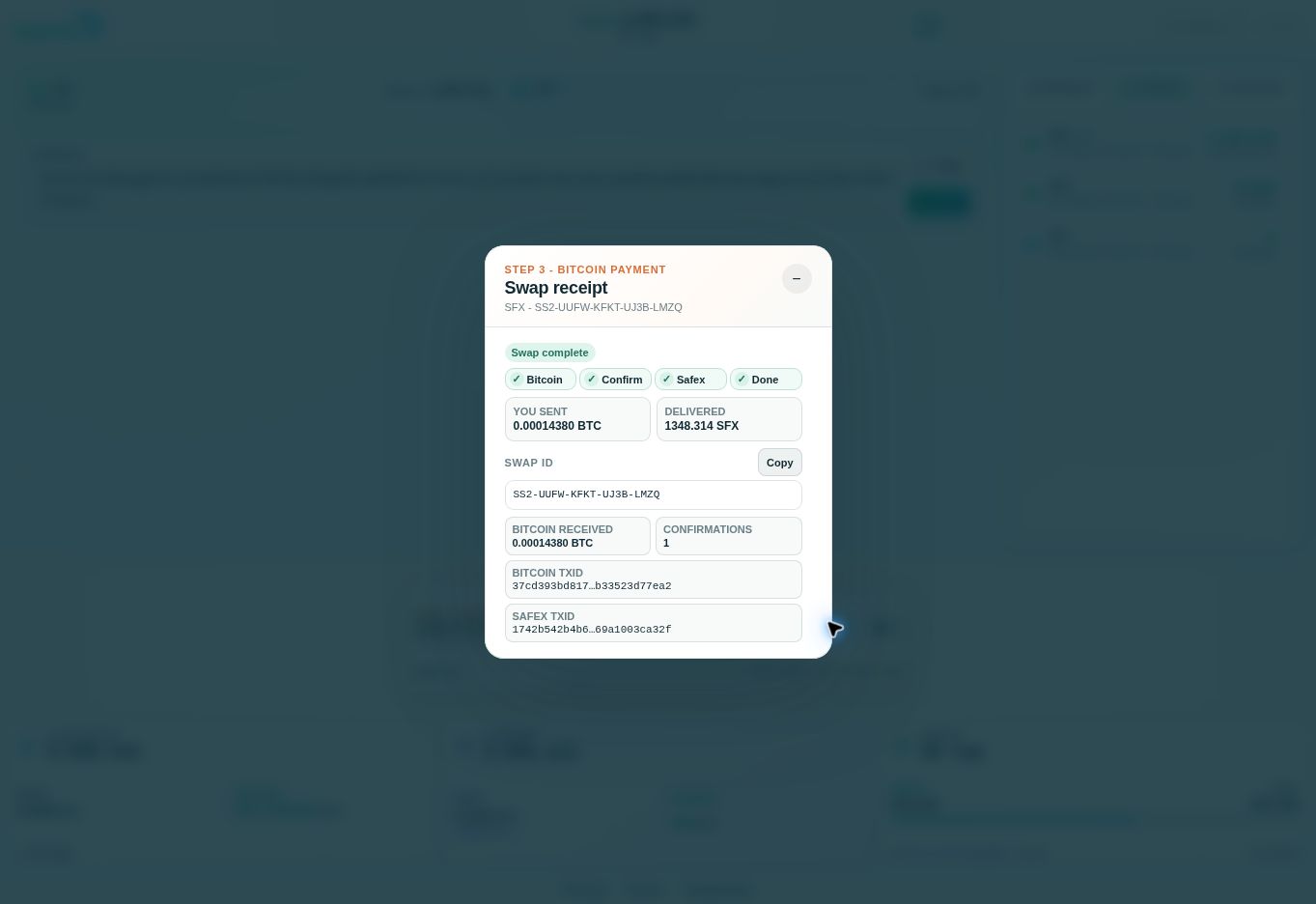
The swap receipt shows 1,348.314 SFX delivered and records both the Bitcoin transaction and the Safex transaction. A transaction ID identifies a blockchain payment; the Swap ID identifies the purchase order. Swap complete describes delivery, while History tells you whether the coins are available in your wallet.
Buying SFT uses the same flow
After the SFX order, choose New in the swap panel, select SFT and check the fresh quote. Use This opened wallet again to receive SFT at the same address. Review the SFT agreement and pay the new Bitcoin invoice.
Our second order quoted 1,791 SFT for $12. The final invoice requested 0.00014430 BTC (14,430 satoshis), slightly different from the preview as the Bitcoin quote refreshed. We sent the full final invoice amount, and the swap detected it.
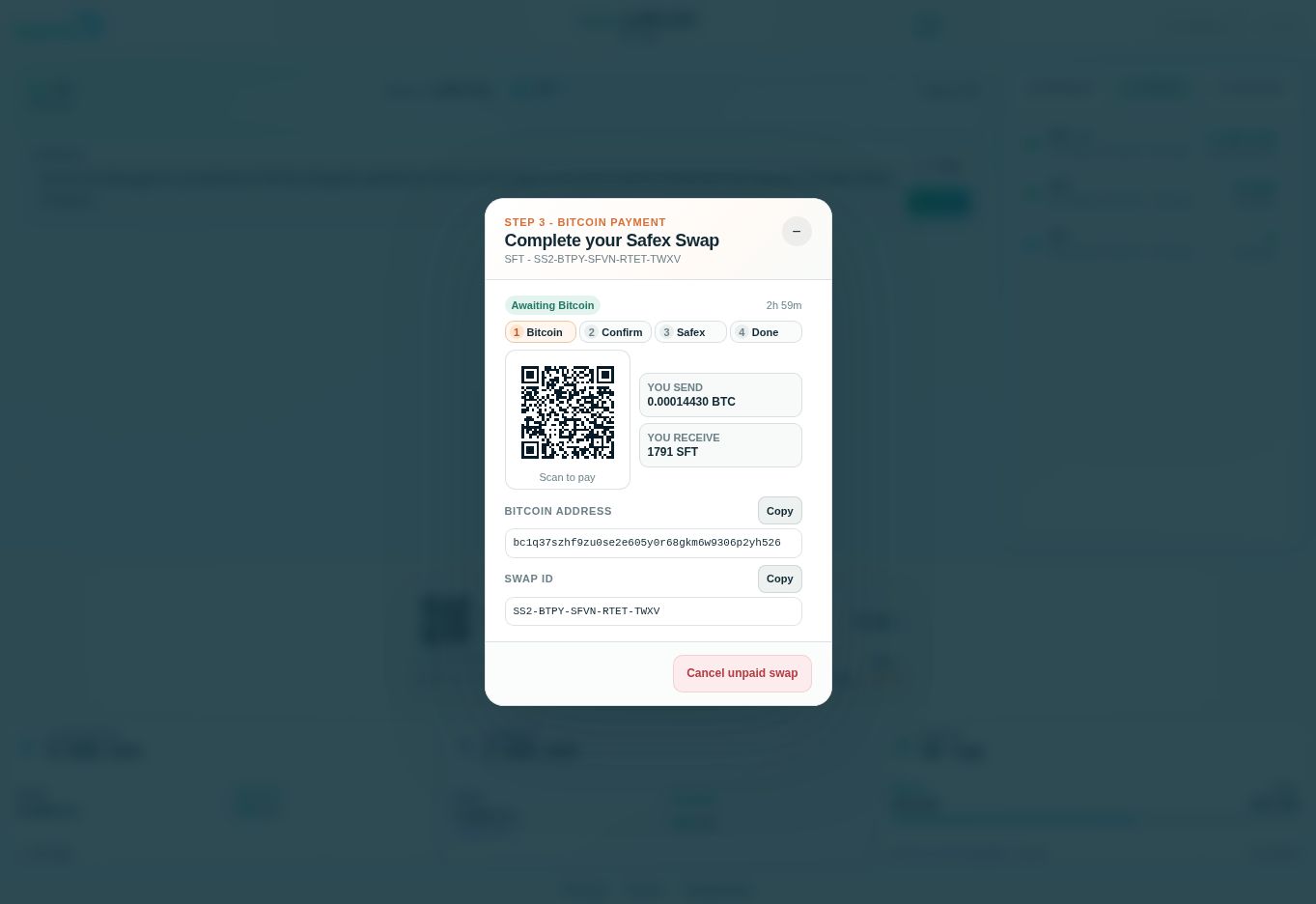
Each purchase has its own invoice. Do not reuse the Bitcoin address from the SFX order. The new incoming row is labelled SFT. In our demonstration, the wallet showed the actual +1,791 SFT payout in Mempool.
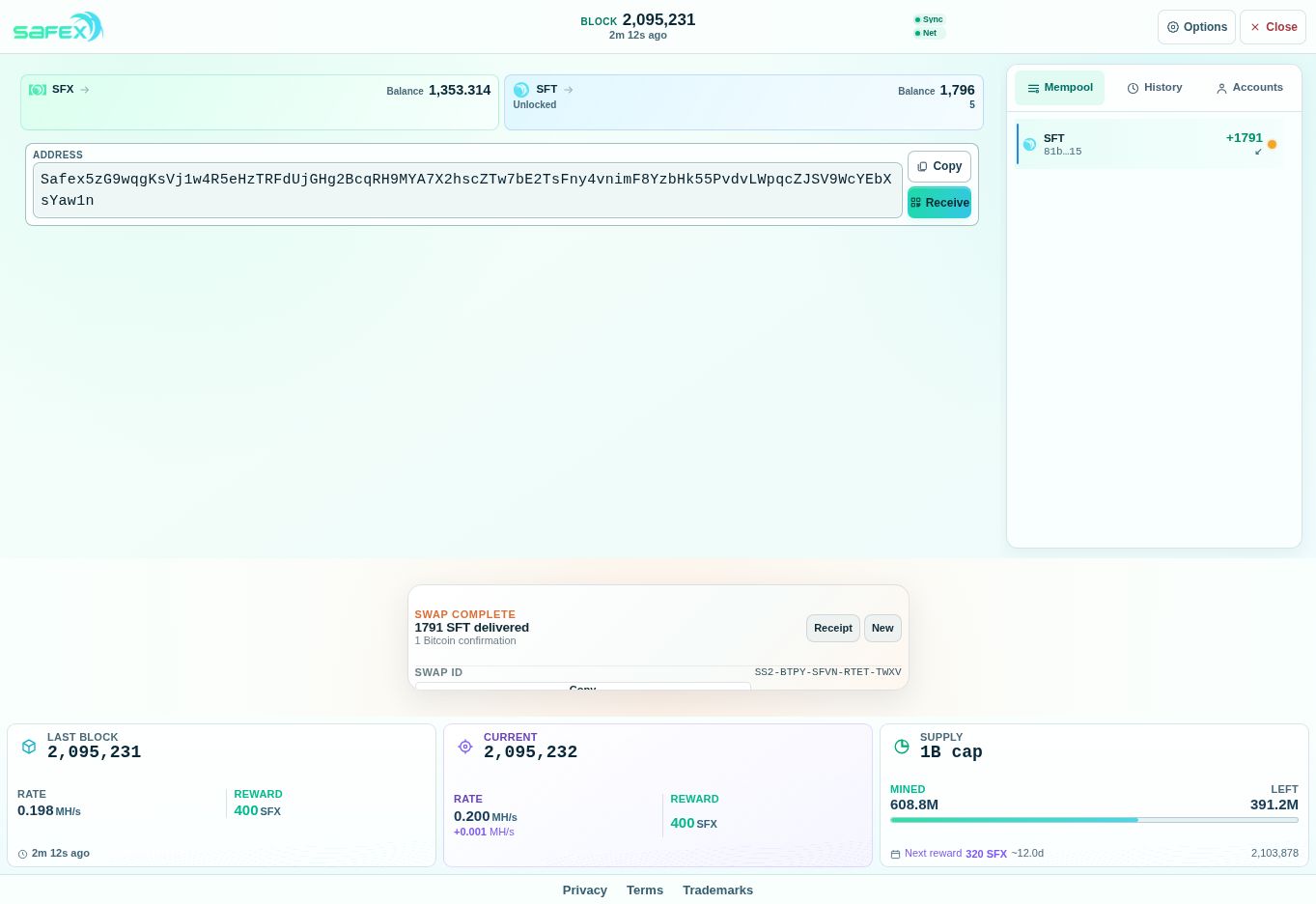
History showed the same incoming amount as Pending in mempool. The SFT balance became 1,796 SFT: the original 5 faucet tokens plus the 1,791 purchased tokens. The 1,353.314 SFX balance stayed separate.
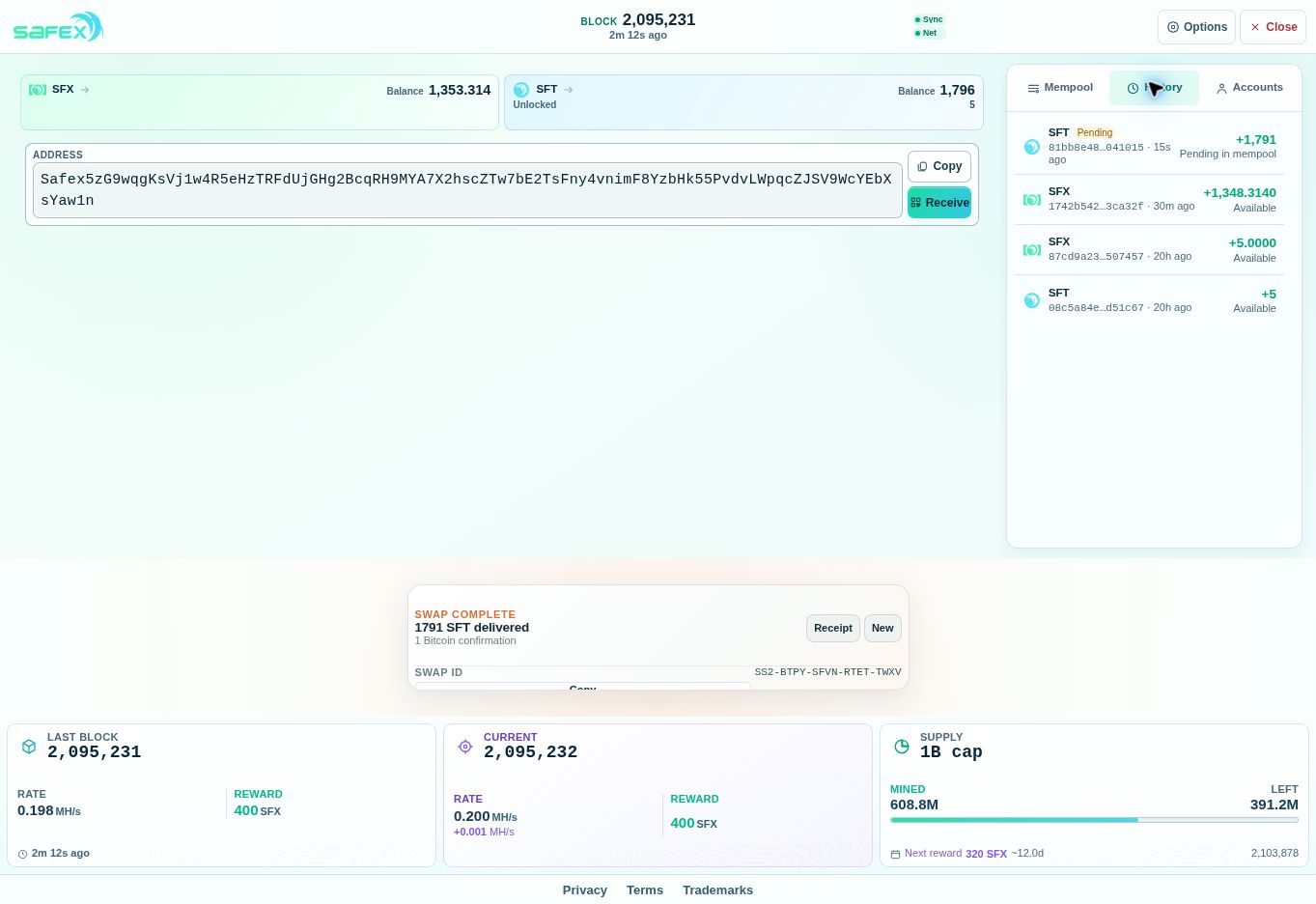
The SFT payment then changed to Confirming. The earlier SFX purchase was already Available, as the screenshot shows. Allow each incoming payment to reach Available before you try to use it.
Both orders now have completed swap receipts. Here is how the amounts add up:
| Asset | Starting faucet coins | Purchased coins | Wallet balance after delivery |
|---|---|---|---|
| SFX | 5 | 1,348.314 | 1,353.314 |
| SFT | 5 | 1,791 | 1,796 |
A little later, both purchases showed Available. The final screenshot below completes the journey from Bitcoin payment to coins ready to use in the same Safex wallet.
If the screen does not look right
- Bitcoin sent, but not detected: check the payment in your Bitcoin wallet and compare its address and amount with the live invoice. Keep the Swap ID and transaction ID; avoid sending a duplicate payment just because the page has not updated.
- Bitcoin detected, Safex not yet received: read the swap's current status. Bitcoin confirmation and Safex delivery take separate steps. Keep the wallet open and check History as well as Mempool.
- Invoice expired or the amount was wrong: consult the payment policies shown in your order. Late or partial payments may need review. Contact ss@safex.org and provide your Swap ID, as the agreement directs.
- Coins received but marked Confirming: wait for the wallet to show Available. You do not need a new invoice.
Only your public address is needed to receive Safex. Never send support your recovery words, SWIF, private keys or backup password. Use your own backed-up wallet; the wallet pictured here is a demonstration wallet.
Screenshots document real activity at safex.org on September 27, 2026. Amounts are historical examples, not live quotes. Asset-purpose descriptions were checked against Safex and its purchase agreement; the walkthrough follows the wallet's displayed status.